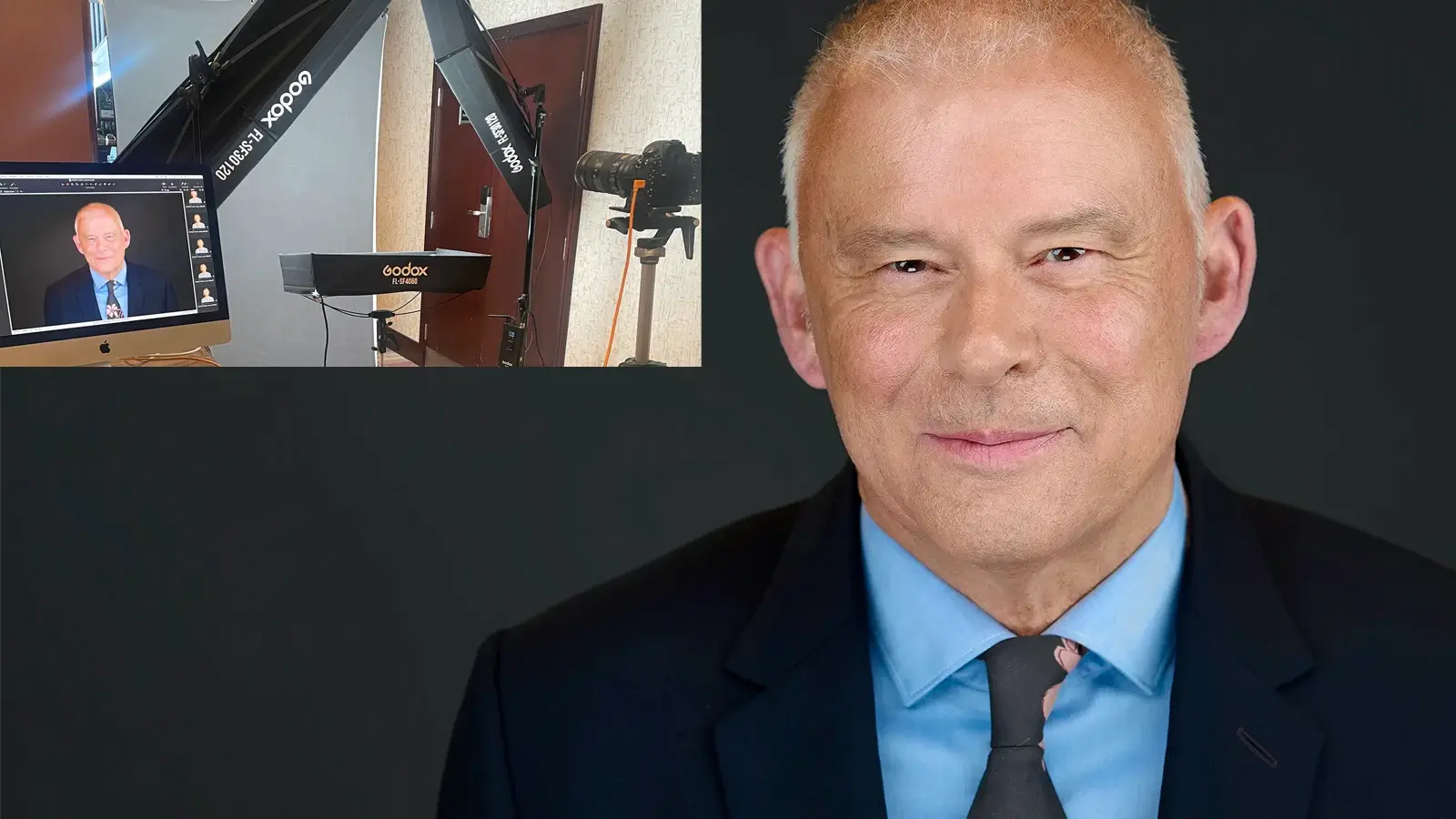
Office Headshots: What to Expect When I Bring a Mobile Studio to Your Workplace
If you’re organising office headshots (headshots at your office) for a team,
you want it to run smoothly, look consistent, and feel easy for staff. This guide explains
exactly how the day works, what I need from you, and what people receive afterwards.
Team headshot day at a glance
If you’re organising office headshots for a team, this is the quick version you can forward
internally.
- Setup time: around 30 minutes
- Time per person (teams): typically 5–10 minutes each
- Space needed: a small meeting room or quiet corner works well
- Live review: each person sees a few frames as we go so we can adjust
fast - What staff receive: finished headshot(s) supplied in web-ready and
high-res versions, neatly organised - Delivery: two working days for teams
Who this is for (and what usually worries people)
This post is mainly for the person organising the day: PA/EA, HR, Internal Comms, Marketing,
Office Manager, Ops, or whoever has drawn the short straw.
It’s also for the camera-shy people who will quietly Google “what happens at a headshot session”
the night before.
The common concerns I hear are very practical:
- “Will this disrupt the day?”
- “How much space do you need?”
- “What do I tell staff to wear?”
- “How do people choose their photo?”
- “Can you keep it consistent across the team?”
Good news: a team headshot day is straightforward when the process is clear.
What I need from you: space, schedule, and one point of contact
To make a headshot day run smoothly, I only need a few things agreed in advance.
Space requirements: a meeting room or quiet corner
A small meeting room is ideal, but it’s not essential. A quiet corner can work just as well.
What matters most is:
- A bit of separation from heavy footfall (so people can relax)
- Enough room for a backdrop and lights
- A nearby plug socket
You don’t need “good natural light”. I bring the lighting that creates the look.
Scheduling options: time slots vs drop-in
There are two common ways to run it:
- Pre-booked time slots – best when diaries are tight. People know exactly
when to turn up. - Drop-in flow – best when teams are flexible. It can feel easier, but it
needs a little herding.
Often, a hybrid works well: leadership on slots, everyone else drop-in.
If you’re booking a team day, you’ll also want to look at my corporate headshot approach here: corporate headshots.
What happens on the day (step-by-step)
1) I arrive and set up (around 30 minutes)
I’ll arrive, say hello, confirm the space, and then set up the mobile headshot studio.
Setup usually takes around 30 minutes. While that’s happening, your team can carry on working.
It’s a quiet setup, and I’m used to office environments.
2) Each person’s slot (teams: 5–10 minutes)
For a team day, most people take 5–10 minutes each.
The rhythm is simple:
- quick hello and reset posture
- a few frames to get comfortable
- small adjustments (chin, shoulders, expression)
- confirm favourites as we go
If someone needs a little longer, that’s normal. Some people settle immediately, others need a
minute to stop feeling “on show”. The point is to keep it calm, not rushed.
3) Live review and quick adjustments
This is the part most people find reassuring.
I show each person a few frames as we go. If something looks off, we fix it straight away. That
might be a small change in posture, a subtle expression shift, or adjusting the angle.
It removes the “hope it worked” feeling and helps camera-shy people relax quickly because they
can see what’s happening.
Team headshot day vs individual session: what’s different
This is where many posts get vague, so here’s the clear split.
Team headshot day
- Time per person: typically 5–10 minutes
- Focus is on consistency across the team (lighting, framing, background)
- Live review stays quick and practical
- The organiser needs a smooth flow and predictable delivery
Individual session
- Time is usually longer than a team slot
- We can explore more variation in expression and options
- It’s more tailored to role, audience, and personal goals
Both are coached. The difference is simply pace and scope.
What staff receive after the session
This is the bit organisers care about, because it’s what gets used across the business.
File formats, crops, and naming
After the shoot, your team receives finished images supplied in two versions:
- Web-ready for LinkedIn and websites
- High-res for print and internal use
Files are neatly organised so you’re not chasing people for “the right version” later.
If you’d like images named per person to make admin easier, that’s something we can plan for as
part of the schedule.
Delivery timeline
For teams, finished images are delivered in two working days.
Optional add-on: personal branding images for leadership/marketing
Sometimes the organiser also wants a small set of extra images for leadership or marketing use,
beyond the standard headshot.
If that’s you, I can add a short personal branding block into the day (usually for one or two key
people) to capture a wider range of images for web and content. If that’s helpful, take a look
here: personal
branding photography.
Organiser FAQ
What should people wear?
Solid colours usually work best. Avoid busy patterns
and loud logos. If someone’s unsure, a smart jacket or a simple top is a safe choice.
Do glasses cause problems?
Glasses are fine. I’ll watch for reflections and
adjust the setup if needed.
What if someone is late?
It happens. If we’re running slots, I’ll either swap
them with the next person or bring them in at the next available gap.
Can we include new starters or last-minute additions?
Usually yes, as long as
we’ve got a little buffer. If you expect changes, tell me up front and I’ll suggest a schedule
that can cope.
How do people choose their photo?
Through live review. People see a few
frames as we shoot, we adjust, and we confirm favourites as we go. It keeps the day moving and
avoids a big “choose later” admin task.
Final checks to make the day run smoothly
If you’re the organiser, here’s the short checklist that saves hassle:
- Choose a quiet space (meeting room or corner)
- Decide on slots, drop-in, or hybrid
- Share a simple “what to wear” note to staff
- Have one point of contact available for quick questions
- Allow a little buffer for late arrivals and last-minute changes
Organising a team headshot day?
Message me here or check availability on the contact page. I’ll suggest the best setup and a
simple schedule for your team.
If you’d like to compare approaches, you can also read Mobile vs Studio.